This section tests a learner in the following math strands (subjects or areas)
The learner will:
- Know how to add, subtract, multiply and divide from clues in word problems.
- Know how to work with whole numbers and fractions in life-like applications.
- Problem solve using percentages and ratios in life-like applications.
- Demonstrate and understand the concepts of number sense, place value and number relationships to compare, order, and determine equivalence of whole numbers, fractions, decimals, percents and integers.
- Demonstrate the use of estimation skills in life-like situations.
- Demonstrate how to measure objects and interpret results from objects measured.
- Read, and interpret information from one and two-dimensional graphs such as tables, charts, maps, bar-graphs, and analyze data, patterns, trends to make predictions.
- Utilize basic concepts of probability and statistics.
- the presents of geometric and spatial relationships in life-like situations.
Use the formulas below to help you solve questions in the following section.
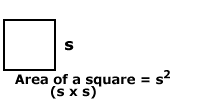 |
To measure the area of a square, multiply the side “s” x the side “s.” |
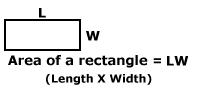 |
To measure the area of a rectangle multiply the length (L) of one side by the width (W) of another. |
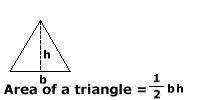 |
To measure the area of a triangle, multiply 1/2 x b x h. Using a calculator, enter “.5” “x” “whatever base is” x “whatever height is.” |
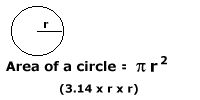 |
To measure the area of a circle, multiply 3.14 (pi) x radius x radius. Using a calculator, enter “3.14” “x” “whatever r is” x “whatever r is.” |
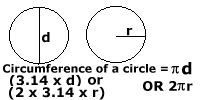 |
To measure the circumference of a circle (how far it is around the circle), multiply 2 x 3.14 (pi) x radius x radius or 3.14 x d (diameter). Using a calculator, enter “2” x “3.14” (pi) x “whatever r is.” Or enter “3.14” x “whatever d is.” |
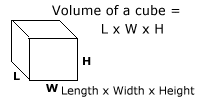 |
To measure the volume of a cube (how much space is inside the cube), multiply Length x Width x Height. Using a calculator, enter “whatever the length” x “whatever the width” x “whatever the height.” |
 |
Directions:
- The following questions are multiple choice.
- Circle the best answer. There is only one correct answer.
- This test is not timed.
- The first 12 questions are estimation problems and DO NOT require a calculator.
- A calculator is not necessary but may be used on problems 13-end of test.
Sample Problem
Which of the following numbers is less than 15?
- 13
- 18
- 21
- 16
The correct answer is A. (13)